
proPilot 5.11.0 is now live — welcome to an even more powerful experience!
Let’s discover the new features and improvements designed to enhance the user experience and accelerate the monitoring of your initiatives!

Take greater control of your visualization scope with multi-level filters
Unified Charts and Indicator Tables now support configurable reference filters based on all available levels.
-
Users can combine filters defined across multiple levels to display only the entities that match the selected combination of criteria.
-
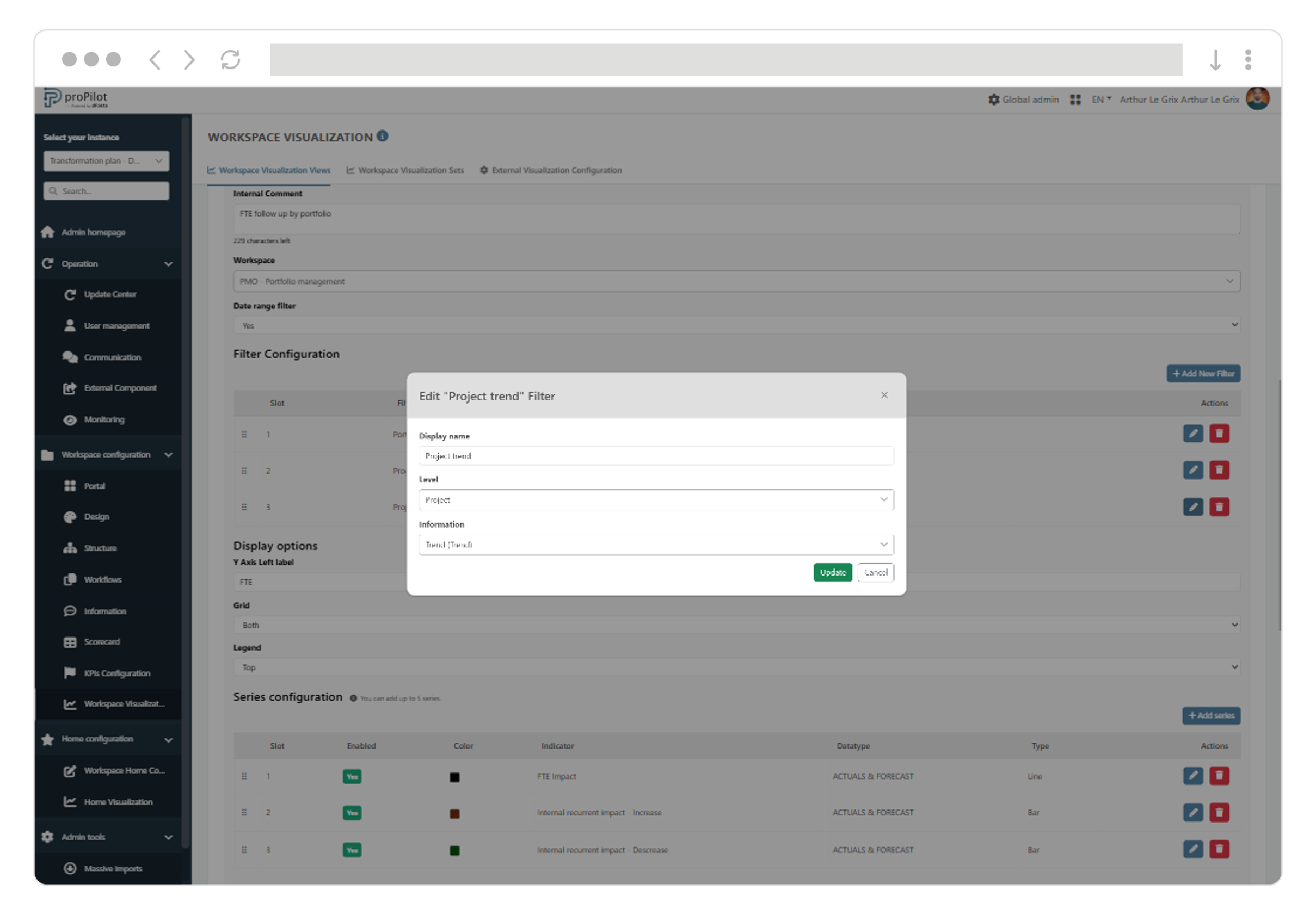
As an administrator, configure up to six filters based on information available within entities: multi-select lists, image lists, or lifecycle statuses.
-
Easily manage filters from a dedicated section: associate each filter with a level and an information field, define their display order, and align them with your business concepts by customizing their display names.
Things are moving fast… many improvements are delivered with every release!
Unified Charts and Indicator Tables are now clearer and easier to read
Filters and search are now more precise and relevant
-
Lifecycle filters dynamically display the statuses defined for the relevant level.
-
Image List filters now correctly take into account values collected at the parent level.
-
An empty value is now available as a filter option when no information has been entered for certain entities.
-
The selected end period in the date filter is now included when displaying data.
Data display performance has been improved
-
Chart performance has been enhanced, particularly when displaying detailed data.
Chart readability and data sharing have been simplified
-
Indicator display names are now shown in the tooltips of Unified Charts and Indicator Tables.
-
Excel data export is now available across all visualizations.
In Unified Charts
-
Legend tooltips now display the indicator and its associated data type.
-
Unified Charts now adapt more effectively to both desktop and smartphone screens.
In Indicator Tables
-
The display order of indicators and data types has been improved.
-
Data types available in filters are now limited to those returned through indicator consolidation.
-
Governance information associated with each indicator is now displayed to users.
Configuring the new visualizations is now more reliable and user-friendly
-
Indicators in configurable Indicator Tables can now be reordered.
-
Indicator selector display has been optimized when configuring a Unified Chart.
-
The period filter is now enabled by default when configuring a Unified Chart.
-
When configuring visualization filters, the information selector now displays the visible name of the information field followed by its technical name.
A lot is happening… Multiple improvements are included in every new release!
The local administration interface has been optimized
-
Task processing statuses are now translated into all languages available in the monitoring interface.
-
The “Cancelled” status now has a clearer icon in task monitoring.
-
The row-count selector used across tables has been optimized.
-
The display order of workspaces on the home page has been improved.
Technical guide for upgrading proPilot
|
Component |
Version |
|---|---|
|
ProPilot-API |
16.0.0 |
|
proPilot-UI |
5.11.0 |
Actions required when upgrading to this version
To simplify the installation and maintenance of proPilot, configuration is now centralized in a single location.
Some parameters that were previously stored in the database must now be defined in the application's unified configuration file.
During the automatic upgrade process, the relevant keys currently stored in the Config table will be automatically removed from the database.
It is therefore essential, before starting the installation of this version, to retrieve the values currently configured and transfer them to the configuration file.
The list of affected parameters is provided below. All required values should already be available in the Config table, either in the global database or in the instance database.
For example, to define the value of the publicUri parameter in the configuration file (appsettings or Docker configuration), copy the value currently associated with the publicUri key in the Config table.
Section “AppSettings”
-
AppSettings__applicationName
If you want to customize the application name in your company. -
AppSettings__publicUri
Sample: https://www.your-company.com
Will be used to create clickable links from external documents like Excel exports. Add the port if required (e.g. http://localhost:4200) -
AppSettings__applicationLanguage
Default language of the application. Chose one of the supported value: en, fr, nl -
AppSettings__availableLanguages
If you want to restrict the available languages in the language selector.
e.g. “en,fr” will remove the “nl” option from the language selector.
Section “AppFolders”
-
AppFolders__globalLicenseFolderPath
Specify the folder where the license files will be located.
If you leave this parameter empty, a default accessible location under the temp folder is used
☝️ note that the temp folder is not volatile or temporary, it is currently used as a standard folder.
Section “Smtp”
-
Smtp__From
'SmtpSenderEmailAddress' key in DB
Adress used by the application (sender) to send emails.
usually noreply@yourCompany.com -
Smtp__SenderDisplayName
To customize the sender display name -
Smtp__AdminMail
Email address of the application administrator (if you want the end user to be able to contact the administrator) -
Smtp__AddReplyToAdminInAllEmails
If you set it to true, the ReplyTo parameter of the emails will be set to the AdminMail value.
In other words, users will be able to reply to the emails sent by the application, and the replies will be routed to the administrator (AdminMail) -
Smtp__ErrorMailRecipient
Application errors will be sent to this email address (in addition to being reported in log files).